Every year, over a million people in the U.S. end up in the emergency room because of unexpected reactions between their medications. Many of these cases could have been avoided with a simple check at home - if you know how to do it right. Checking for drug interactions isn’t about replacing your doctor. It’s about catching problems before they happen. Whether you’re taking blood pressure pills, antidepressants, vitamins, or herbal teas, your medications can react in ways you never expect. The good news? Free, reliable tools exist. And using them correctly can keep you out of the hospital.
What Exactly Is a Drug Interaction?
A drug interaction happens when two or more substances affect each other in your body. This isn’t just about prescription pills. It includes over-the-counter pain relievers like ibuprofen, herbal supplements like St. John’s Wort, even grapefruit juice. There are three main types:- Drug-drug interactions - the most common, making up 61% of all cases. For example, mixing warfarin (a blood thinner) with ibuprofen can increase your risk of bleeding.
- Drug-food/drink interactions - 27% of interactions. Grapefruit can make cholesterol meds too strong. Alcohol can turn sleep aids into dangerous sedatives.
- Drug-condition interactions - 12%. Taking decongestants if you have high blood pressure? That’s risky.
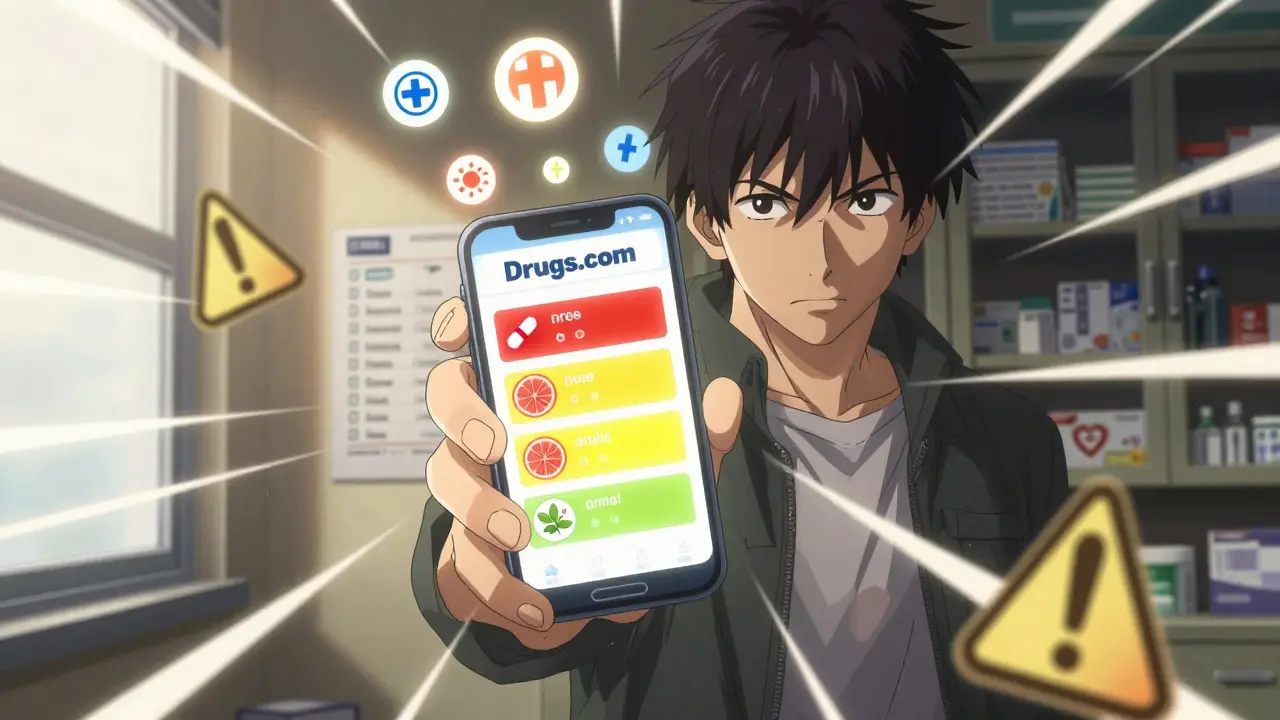
Severity matters too. Tools like Drugs.com and WebMD label interactions as major, moderate, or minor. Major means immediate danger - like serotonin syndrome from mixing antidepressants and certain supplements. Moderate means you need to watch for side effects or adjust doses. Minor might just mean a little extra drowsiness.
Which Tools Can You Trust?
Not all apps and websites are created equal. Stick to ones backed by medical databases and updated regularly. Here are the top three trusted options:| Tool | Database Size | Best For | Limitations |
|---|---|---|---|
| Drugs.com | 80,000+ interactions | Most comprehensive - includes supplements, foods, and rare combos | Uses technical language; can be confusing for seniors |
| WebMD | 18,000+ prescription drugs | Simple, visual results with clear severity icons | Higher false positive rate - flags some harmless combos |
| GoodRx | Full drug database + cost filters | Shows safer, cheaper alternatives when interactions are found | No detailed explanations - just alerts |
Drugs.com is the most thorough. It catches 12% more moderate interactions than WebMD. But if you’re not a medical professional, WebMD’s color-coded system (red = major, yellow = moderate, green = minor) is easier to understand. GoodRx is great if you’re also trying to save money - it suggests alternatives that avoid the interaction and cost less.
How to Use a Checker - Step by Step
Using these tools isn’t hard, but doing it wrong can give you false confidence. Follow these steps every time you start a new medication or change your routine.- Make a full list of everything you take. Don’t skip vitamins, herbs, or occasional painkillers. Include the dose and how often you take it. Example: “Melatonin 3mg nightly,” “Fish oil 1,000mg daily,” “Ibuprofen 200mg as needed for headaches.”
- Use the barcode scanner in Medisafe or GoodRx. If you have a smartphone, scan the pill bottle. These apps auto-fill the drug name and dosage. This cuts down mistakes - especially with OTC meds where the active ingredient isn’t obvious (like “acetaminophen” hiding under 20 different brand names).
- Enter everything into your chosen checker. Don’t guess names. Use the exact spelling. “St. John’s Wort” not “St. John’s.” “Sertraline” not “Zoloft” - though most tools accept both.
- Read every flagged interaction. Don’t just look at the color. Click on “major” alerts. Read what it says. Is it about bleeding? Liver damage? Dizziness? If it mentions serotonin syndrome, arrhythmia, or kidney failure - don’t ignore it.
- Take the results to your pharmacist. Don’t stop your meds based on an app. Bring your list and the printout or screenshot. Pharmacists are trained to interpret these results. They’ll tell you if it’s a real risk or just a theoretical one.
Update your list every 30 days. Even if nothing changed, rechecking catches new interactions. New research comes out constantly. A supplement you took safely last year might now be flagged with your blood pressure med.

What These Tools Can’t Do
It’s easy to think these apps are foolproof. They’re not. Here’s where they fall short:- They miss rare or new interactions. A 2023 case report showed a new cancer drug didn’t trigger any alerts - even though it caused dangerous heart rhythms in patients.
- They don’t know your full health picture. If you have kidney disease or are pregnant, the tool can’t adjust for that. Only your doctor can.
- They can give false alarms. About 18% of flagged interactions aren’t actually dangerous. WebMD users reported this in 23% of cases. You might stop a safe medication unnecessarily.
- They don’t replace a pharmacist. A 2023 study found that people who used a checker and talked to a pharmacist reduced hospitalizations by 42%.
One woman in Wisconsin caught a dangerous interaction between her antidepressant and St. John’s Wort using Drugs.com. She didn’t stop the med - she called her pharmacist. They switched her to a safer option. That’s the right way to use these tools.
Red Flags to Watch For
If you’re checking your meds and see any of these, act fast:- Confusion, dizziness, or fainting. Could mean your blood pressure dropped too low.
- Unusual bruising or bleeding. Could mean blood thinners are too strong.
- Fast heartbeat, chest pain, or trouble breathing. Could signal a heart-related interaction.
- Severe nausea, vomiting, or dark urine. Could mean liver damage from a combo.
- High fever, muscle stiffness, or sweating. Could be serotonin syndrome - a medical emergency.
If you feel any of these after starting a new med or supplement, stop it and call your doctor or go to urgent care. Don’t wait. Don’t check the app again.

How to Stay Safe Long-Term
The best way to avoid interactions isn’t just using an app - it’s building habits:- Use one pharmacy for all your prescriptions. It’s not just convenient. Pharmacies track all your meds in one system. Studies show this cuts interaction risks by 31%.
- Ask your pharmacist to review your list every 6 months. Even if you’re not changing meds, they might spot something new.
- Don’t assume “natural” means safe. St. John’s Wort, ginkgo, garlic - all can interfere with prescription drugs. Just because it’s sold in a health food store doesn’t mean it’s harmless.
- Keep a printed copy of your med list. Put it in your wallet. Show it to any new doctor or ER staff. Most people can’t remember every pill they take.
By 2030, nearly one in three adults will be taking five or more medications. That’s a lot of chances for something to go wrong. The tools are here. The data is updated. But the most powerful safety net is still a conversation - with your pharmacist, your doctor, or even a trusted family member who can help you read the results.
Can I rely on my phone app to tell me if my meds are safe?
Apps like Drugs.com and WebMD are great for spotting common interactions, but they’re not perfect. They miss rare combos, don’t know your full health history, and sometimes flag harmless mixes. Use them as a first step - not the final answer. Always talk to your pharmacist before making changes.
What if I can’t find the active ingredient on my OTC bottle?
Look for the “Active Ingredients” section on the Drug Facts label. If it’s too small to read, take a photo and use the barcode scanner in Medisafe or GoodRx. Or call your pharmacy - they can look it up by the brand name. Don’t guess. Mixing acetaminophen from three different cold meds is a leading cause of liver damage.
Are herbal supplements really dangerous with prescription drugs?
Yes. St. John’s Wort can make birth control, antidepressants, and blood thinners ineffective. Garlic and ginkgo can increase bleeding risk with aspirin or warfarin. Turmeric can interfere with diabetes meds. Just because it’s sold as a “natural remedy” doesn’t mean it’s safe with your prescriptions.
Why do I get different results on WebMD vs. Drugs.com?
They use different databases. Drugs.com has more data - especially on supplements and food interactions. WebMD sometimes misses those. But WebMD’s interface is simpler. If one tool flags something and the other doesn’t, trust the one that says it’s major. And always check with your pharmacist.
Should I stop a medication if the app says it’s dangerous?
No. Never stop a prescribed medication without talking to your doctor or pharmacist. Some flagged interactions are theoretical or only risky at high doses. Stopping suddenly can cause withdrawal or make your condition worse. Use the app to start a conversation - not to make decisions.
Is it safe to use these tools if I’m over 65?
Yes - and it’s especially important. About 40% of adults over 65 take five or more medications. That’s a high risk for interactions. Many seniors use these tools successfully. If the language is confusing, ask a family member to help or call your pharmacist. They’re used to explaining this stuff in plain terms.
What to Do Next
Start today. Open your medicine cabinet. Write down every pill, capsule, drop, and gummy you take - even the ones you only use once in a while. Then pick one tool - Drugs.com or WebMD - and enter them all. Don’t rush. Take your time. If something comes up as major, don’t panic. Just write it down. Then call your pharmacy. They’re trained to help you with exactly this.Medication safety isn’t about being perfect. It’s about being aware. And with the right tools and habits, you can avoid the majority of preventable drug reactions - without ever stepping into a hospital.

Write a comment
Your email address will not be published.
Recent Posts
-
 Genetic Testing for Cancer Risk: BRCA, Lynch, and Beyond December 15, 2025
 -
 How Culture Shapes What We Accept - Even When It’s Generic March 21, 2026
 -
 How and Where to Buy Dapasmart Online Safely (2025 Guide) September 14, 2025
12 Comments
Drugs.com is the only one that matters. WebMD is for people who think 'natural' means 'safe' and GoodRx is just a coupon site pretending to be medical advice. If you're not using the full FDA database, you're gambling with your life.
OMG YES. I just found out my turmeric supplement was messing with my blood pressure med and I had no clue. I almost didn't even check because I thought 'it's just herbs'... until I started feeling like a zombie. Thank you for this. I printed my med list and taped it to my fridge. Now my whole family knows what I'm taking. Game changer.
use the barcode scanner in goodrx its a lifesaver. i used to mix up tylenol and cold meds and end up takin 3000mg of acetaminophen by accident. now i just scan and it tells me if its the same stuff in another bottle. dumb simple. why didnt i do this years ago??
How is this even a topic? People are still dying from avoidable drug interactions in 2025? You're telling me the average American can't read a pill bottle or ask a pharmacist? This isn't a public service announcement-it's a national embarrassment. We've outsourced basic responsibility to apps and now we're surprised when the system fails? Pathetic.
I’ve seen this play out with my mom-she took St. John’s Wort for ‘mild anxiety’ and didn’t realize it was canceling out her antidepressant until she had a full-blown depressive episode. The scary part? She didn’t even think to mention the supplement to her doctor because ‘it’s just natural.’ We need to normalize asking, ‘Is this safe with my other meds?’ like it’s as routine as checking expiration dates. It’s not about fear-it’s about care.
And honestly? The fact that we need apps to catch these things says something about how fragmented our healthcare system is. If your pharmacist knew everything you took, we wouldn’t be here. But since they don’t, we have to be our own advocates. Start small. Write it down. Scan it. Talk to someone. You’re not being paranoid-you’re being smart.
Why do people still take ginkgo? It’s like drinking liquid risk. I’ve seen three people in my family end up in the ER because of ‘natural’ supplements. You think you’re being healthy but you’re just playing Russian roulette with your liver.
As a pharmacist in the UK, I can confirm: 80% of interactions we catch come from patients who didn’t mention their supplements. Even ‘harmless’ ones like magnesium or vitamin D can interfere with thyroid meds or antibiotics. The tools mentioned are solid-but the real hero is the pharmacist who asks, ‘What else are you taking?’ That question saves lives. Don’t wait for an app to tell you to talk to someone. Just do it.
Why are we letting tech companies dictate medical safety? In my day, people just trusted their doctor. Now we’re扫码 scanning pills like we’re in a video game. This country is falling apart because we’ve replaced wisdom with apps. If you can’t remember your meds, maybe you shouldn’t be taking them.
Bro I just checked my meds and WebMD said my fish oil and blood thinner might cause bleeding. So I panicked, stopped everything, and drove to urgent care. Turned out it was a false alarm. But I’m glad I went. Now I keep a screenshot of every result on my phone. If I pass out, someone can show it to the ER. Literally saved my life.
You’re all missing the point. This isn’t about apps or pharmacists. It’s about the illusion of control. We think if we check an app, we’ve ‘done our part.’ But the real danger isn’t the interaction-it’s the belief that we can outsource our health to a database. You don’t need a tool to know that mixing alcohol with benzos is a bad idea. You need to be present. And most people aren’t. They’re scrolling while their body is slowly shutting down.
My grandma is 78 and uses Drugs.com every time she picks up a new prescription. She doesn’t understand all the jargon, but she knows to bring the printout to her pharmacist. And guess what? She hasn’t been hospitalized in 5 years. You don’t need to be a genius to stay safe-you just need to be consistent. Start today. Write it down. Say it out loud. Share it with someone. That’s how you win.
Thank you for emphasizing the pharmacist’s role. Too often, patients feel they’re bothering their doctor by asking about interactions. But pharmacists are trained specifically for this. They’re not salespeople-they’re safety officers. If you’re unsure, call them. No judgment. No rush. Just ask. It’s what they’re there for.